
One shared plan for meals, shopping, activities and ToDos
OurPlanza keeps your whole weekly plan in one place: what's for dinner, what's happening each day, what to buy and what needs doing — including kids weeks for co-parents.
- Works instantly, no sign-up
- Share the same weekly plan with your family
- Built to be extremely easy to use
Heads up: OurPlanza is under active development. Features may change, and some may require an account or a subscription in the future. Right now you get to use our Premium plan (including everything) for free until launch.
Sound familiar?
Most families plan their week in several different places — and no one has a clear overview.
- “What's for dinner?” asked again at 5 pm, with an empty fridge.
- The shopping list is on one phone, the schedule on another.
- Kids weeks and handover days live in someone's head.
- The same meals get forgotten, the same items get bought twice.
- Nobody knows who was supposed to do what today.
- Do I have to be responsible for everything all the time?
OurPlanza gathers everything in one place — and everyone in the group sees the same thing.
This is what it looks like
Simple, clear, centralized, and everyone sees the same thing.
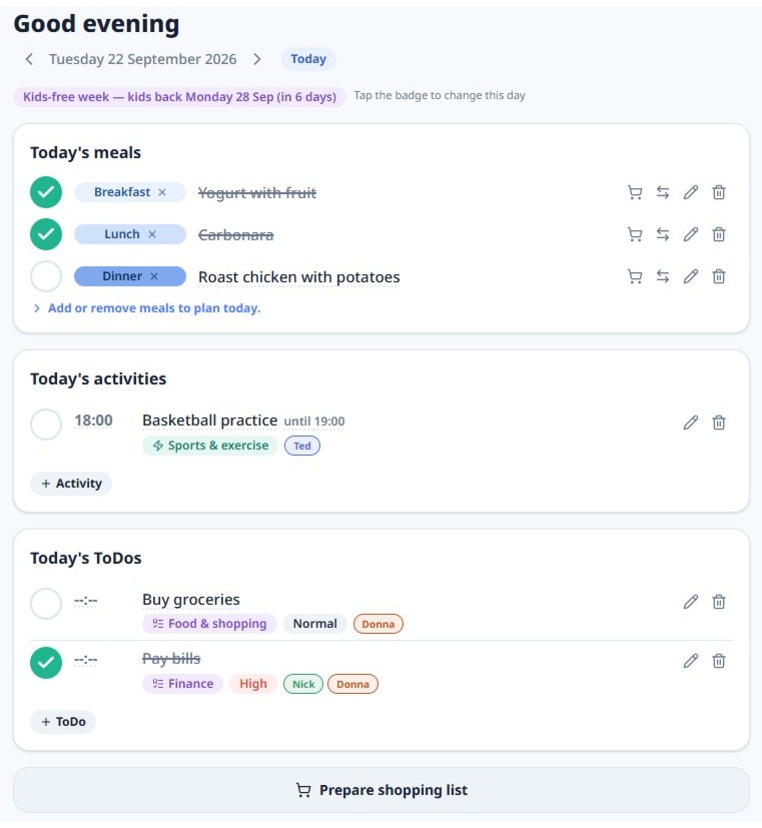
Everything the week needs, in one app
No more juggling a calendar for the schedule, an app for the shopping list and notes spread everywhere.
Weekly meal planning
Decide dinner for every day. Rules like “taco every Friday” fill a week in minutes.
Shopping list from your meals
Your planned meals become a shared shopping list — sorted based on your grocery stores, with quantities and favorites.
Shared ToDo list
Due dates, reminders, priorities, notes and recurring tasks for the whole family.
Kids weeks for co-parents
Every other week — or your own schedule. Each day/period shows whether it is a your kids week or not.
Today at a glance
One screen for today, or the full period when you want the whole picture.
Your own library
Save meals, items, activities and ToDos once — with photos, links and notes — and reuse them.
Who it's for
Families
Parents who want meals, activities, shopping and chores handled in one shared place.
Co-parents
Kids weeks, switch days and single-day overrides, so both homes see the same plan.
Any group that plans together
Housemates, couples, carers — anyone sharing meals, errands and tasks.
People planning on their own
Anyone who wants meals, shopping, activities and ToDos organized in one clear plan.
Up and running in three steps
1. Set up your week
Planning period, which meals to plan per weekday, and your kids weeks if you share kids.
2. Fill your library
Add the meals, items, activities and ToDos you actually use — a starter library is ready for you.
3. Plan and share
Plan the weeks meals, activities and ToDos, let recurring rules repeat them, and share the weekly plan with everyone in the family.
Free now, subscriptions later
Start without an account — your plan is saved on your device. Create a free account to sync across devices and share with your family. Until launch you get everything for free, and you can see exactly what each subscriptions includes.
Questions people ask
Do I need an account?
No. You can plan straight away without signing up — everything is saved on your device, but with some limitations. An account adds syncing across devices, sharing with your family or co-parent and much more.
Does it cost anything?
You can use OurPlanza for free. Until launch every feature is free, and there will always be a free plan.
How does it handle kids weeks?
You choose your rhythm, such as every other week with the switch on Mondays, and single days or whole periods can be overridden when life changes.
Can we plan together?
Yes. With an account you can share the same group, so everyone sees the same plan for meals, activities, shopping list and ToDos, always up to date.
Does the shopping list build itself?
The items in your planned meals go straight to the shopping list (if you want to), grouped by product category or according to your favorites stores and of course quantities. You can add anything extra and tick items off while you shop.
Can I install it on my phone?
Yes. OurPlanza works in the browser and can be installed on your phone's home screen, so it opens like any other app.
Family life simplified — starting this week
Plan the week in minutes, share it with the people who matter, and always know what's for dinner, what to buy and what needs doing.
Start planning — it's free